You might not think of yourself as a public speaker, and your job doesn’t necessarily involve giving speeches, addressing the troops, or preaching to the congregation. But, it’s almost certain that your job involves communicating in front of others in one way or another.
Whether you’re speaking in a Zoom meeting, discussing your performance review with your supervisor, or showing your office crew how the new printer works, you want to communicate effectively.
Developing your public communication skills can put you ahead of the pack and open up new opportunities for you in the new year. Continue reading for three New Year’s resolutions for work that will boost your career in 2024.
Resolution #1: Speak more
If you’re asked to give a presentation or facilitate a meeting, eagerly accept. Even better: Don’t wait to be asked; volunteer.
Think about what speaking opportunities you might find. Be creative. Although these will be New Year’s resolutions for work (career enhancement), the opportunities themselves don’t have to be at work. Here are a few ideas public speaking ideas at — and away from — work:
Give a toast at dinner with family or friends. It can be short and sweet.
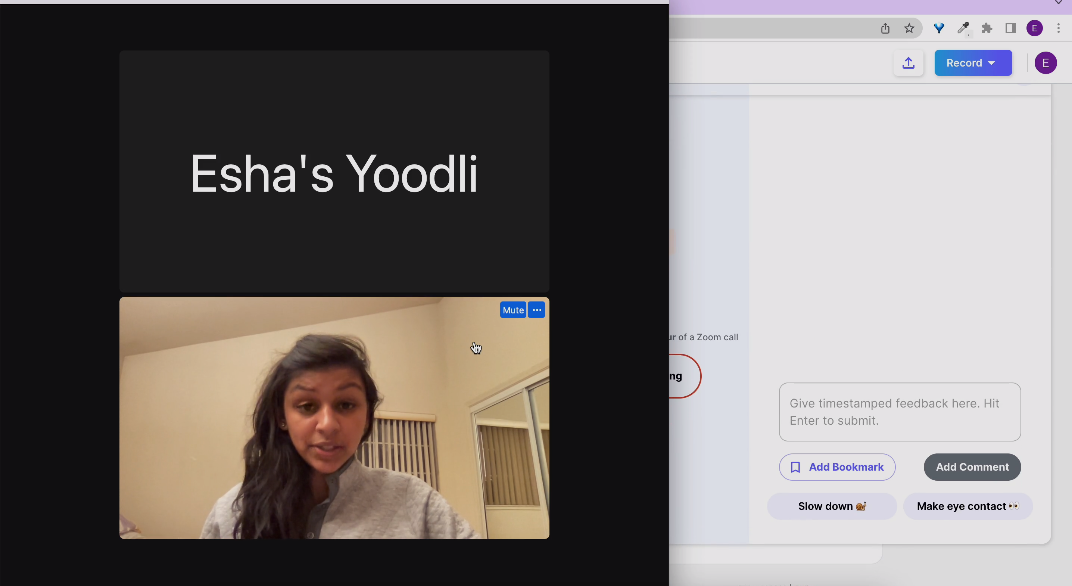
Lead a meeting at work. This will give you a chance to let others speak, moderate a discussion, and speak off the cuff. If it’s a Zoom meeting, you can invite Yoodlibot to attend and provide feedback afterward.
Give the announcements or call for the offering at your church service.
Record a test speech with Yoodli and get feedback for free. If you don’t have something in particular to practice, click on “Not sure what to say? Try with a fun prompt.” (It truly is fun!)
When you make this New Year’s resolution for work, set a concrete, measurable goal. Make it both ambitious and realistic. For example, you could aim to speak once a week. When you consider the wide variety of opportunities — including using the Yoodli AI speech coach — it should be fairly easy to reach your goal.
Resolution #2: Get a speech coach
Feedback is the breakfast of champions and can boost your career by improving your skills. Here are a few tips to guide you as you look for a speech coach:
Determine the credentials of your prospective coaches. You can get a referral from someone you trust, and you can check to see if they’re certified by a reputable entity such as the National Speakers Association or Yoodli. (If they’re a Yoodli coach, you should see this badge.)
Just because a coach is good, it doesn’t mean that they’re the right one for you. Set up a consultation or trial with a speaking coach to find out whether they’re a match for you in terms of philosophy, personality feedback style, etc.
Consider using an AI speech coach instead of, or as a supplement to, a human coach. Especially if you’re just getting started on this journey, you might find that non-human observation and analysis of your speaking is the most comfortable.
Check out this article for more tips on getting a public speaking coach.
Resolution #3: Join Toastmasters
For nearly 100 years, Toastmasters has helped people just like you become confident, skilled public speakers and leaders. Participate with a club in person or online to practice writing and presenting speeches in a supportive group setting.
Membership in a Toastmasters club will undoubtedly boost your skills in public speaking and leadership (another highly-marketable job skill). You’ll also find valuable career-enhancing networking opportunities.
Public speaking is important if you want to inform, persuade, or motivate people. Whatever your role, informing, persuading, and motivating are likely to be part of it. You might need to deliver a quarterly report (inform), convince your boss that your department needs a bigger budget (persuade), or get your team to tackle an ambitious goal (motivate).
Make any or all of the New Year’s resolutions for work outlined above, and check out these additional resolution ideas that will help you improve your high income skills in 2024. Picture yourself at this time next year as a more confident, experienced speaker with an enviable résumé. Now’s the time to start.
What can AI speech coach tell us about one of the most famous speeches ever? Can it provide a useful analysis of Steve Jobs’s commencement speech at Stanford University?
Receiving over 41 million views, Steve Jobs’s 2005 Stanford commencement address stands apart still today. It lets the world in on personal aspects of Jobs’s life and a few lessons he’s learned. He passes these lessons on to a new generation in this iconic speech.
We’ll introduce you to the speech to give you an idea of the content. Then, we’ll show you how the free Yoodli AI speech coach tool provides a useful analysis of Steve Jobs’s commencement speech when it comes to word choice and delivery. We’ll also explain how your own speaking skills can benefit from the same kind of analysis. Take a look.
Steve Jobs’s commencement speech
There’s no doubt that this is a powerful speech that continues to inspire people of all ages. Many commencement addresses are, well, interchangeable. Typically, speakers offer up a list of platitudinous advice for young adults setting sail in life. Jobs’s speech is unique. No one else is going to tell Steve Jobs’s life stories.
“I’m honored to be with you today for your commencement from one of the finest universities in the world.”
Jobs starts by humbling himself and lifting up his audience. It doesn’t come across as insincere flattery. It seems warm and genuine. Great start.
“This is the closest I’ve ever gotten to a college graduation.”
As someone who never graduated from college, Jobs is in a potentially awkward situation in front of all these caps and gowns. However, he uses his first story to explain his educational journey in a way that’s descriptive rather than prescriptive. He never sends the message that college is a waste of time or that he has regrets about his education choices. One of the clever ways he does this is by employing the repeated use of the term “drop in” in contrast with “drop out”: “If I had never dropped out, I would’ve never dropped in on that calligraphy class.”
The speech is simple. “Today I wanna tell you three stories from my life,” he begins. “That’s it. No big deal, just three stories.” While it’s simple, it’s also strategic. Whether he realizes it or not, Jobs uses the rule of three. Three is that “just right” number that feels complete without getting complicated. By employing the rule of three, he’s making it easy for the audience to follow and remember: “The first story is about connecting the dots. … My second story is about love and loss. … My third story is about death.”
Jobs shares deeply personal stories about himself, his biological mother, his prospective adoptive parents, and his adoptive parents. He does a beautiful job discussing their choices without passing judgment on them. We detect no resentment, no bitterness. His tone is tender while being matter-of-fact.
“Windows just copied the Mac.”
This is one of the few times that Jobs uses humor in his address. He takes a small jab at Apple’s biggest competitor in the personal computing space. It’s a fairly benign zing, because it’s done humorously. Surely, even Bill Gates would chuckle a bit.
“I just turned 30, and then I got fired. … I was a very public failure.”
Jobs talks about his career setbacks with humility and candor. He goes on to explain how he learned, grew, and turned it around. With this story, he shows himself to be relatable and inspiring.
A quick look at the insights shows that he has one particular area of improvement: eye contact. He made eye contact with the audience only 29% of the time. When you watch the speech, you see that this is because he’s reading his speech from a podium, so he’s looking down most of the time. As powerful as the speech is, Jobs loses some impact by failing to make a stronger connection with his audience by looking them in the eye more often.
It’s easy to understand: You’ve chosen your words carefully, and you want to get them all out, in the right order. What are some options?
Use a teleprompter. As a comparison, Barack Obama’s 2020 Democratic National Convention speech also was scripted and read. However, he made eye contact with the audience 72% of the time because he used some form of teleprompter.
Memorize your speech. This is quite a bit of work, but it’s possible to memorize your speech to the degree where you aren’t completely dependent on your script.
Use notes instead of a script. With practice, you can get used to leaning on just an outline or some other prompting system that works well for you.
With experimentation, practice, and experience, you can find ways to improve the connection with your audience through eye contact. Practice for free with the Yoodli speech tool, and see your Eye Contact score go up over time!
What went well?
Eye contact is one element of delivery. Otherwise, Jobs does well in the delivery category. His pacing is relaxed, a bit faster than average. His pacing is also varied, which helps keep his audience engaged. Jobs makes good use of pauses, which demonstrates confidence and gives the audience time to take in what he’s saying.
Word choice
In its analysis of Steve Jobs’s commencement speech, the Yoodli AI speech coach provides some positive scores in the Word Choice category. Most helpful, though, are the insights it provides. Let’s see how he does with repetition, filler words, non-inclusive speech, top keywords, and weak words.
Repetition
We can quickly see where Jobs uses repetition. When you use this tool to practice your own speech, you can see at a glance whether you used repetition where you wanted to (for emphasis, etc.) and whether you used it excessively.
Filler words
Jobs reads his speech, which helps him minimize filler words. He says uh only three times. He rarely adds needless utterances to bridge his thoughts. Usually, we’re not aware when we use filler words, so Yoodli brings it to our attention — in the non-judgmental way that only AI can provide. (That always feels better.)
Non inclusiveness
The Stanford graduating class — Jobs’s audience — includes people of various socio-economic levels, religions, sexes, sexual orientations, ethnicities, etc. We can see from his Yoodli Non Inclusiveness score that he does well to keep people from feeling slighted or sidelined.
This tool also lets you know when you use profanity. You might use it when you don’t realize it, and this feedback helps you make sure your language choices fit your audience and the occasion.
Top keywords
According to this metric, Jobs talks a lot about life and college. That seems appropriate for a university commencement address! You can see how the Top Keywords insights help you figure out whether you’re on theme with your word choices.
Weak words
Jobs uses weak words 41 times. That might sound like a lot, but that accounts for only 2% of his speech, so that’s pretty good. His most common weak word is so, which is usually a meaningless bridge between sentences rather than a word that carries meaning and serves your audience.
If these insights were for a speech you were practicing, you might think about where you’re using “very” and “really” and then look for stronger words to use instead. Over time, you’d find yourself using fewer and fewer “throw away” words and more and more words that hit the nail on the head and add substance.
Wrapping up
As we look back on this immortal speech, we’re touched by the poignancy of the moments in which he talks about the cancer that finally took him. We’re inspired by the life he lived and the legacy he left.
It’s fair to say that the very existence of the technology we’ve just used in the analysis of Steve Jobs’s commencement speech is due in part to the innovative spirit that he contributed to the world. We can’t help but think he’d be pleased by the way technology is being harnessed to equip people along life’s way.
If you haven’t done so already, head over to Yoodli to start improving your communication skills with personalized and private feedback from our AI speech coach for free. You’ll be glad you did.
What if you had the oratory skills of Barack Obama? Watching him in action is a great way to learn. Even better, you can learn from a detailed analysis of one of his most important speeches.
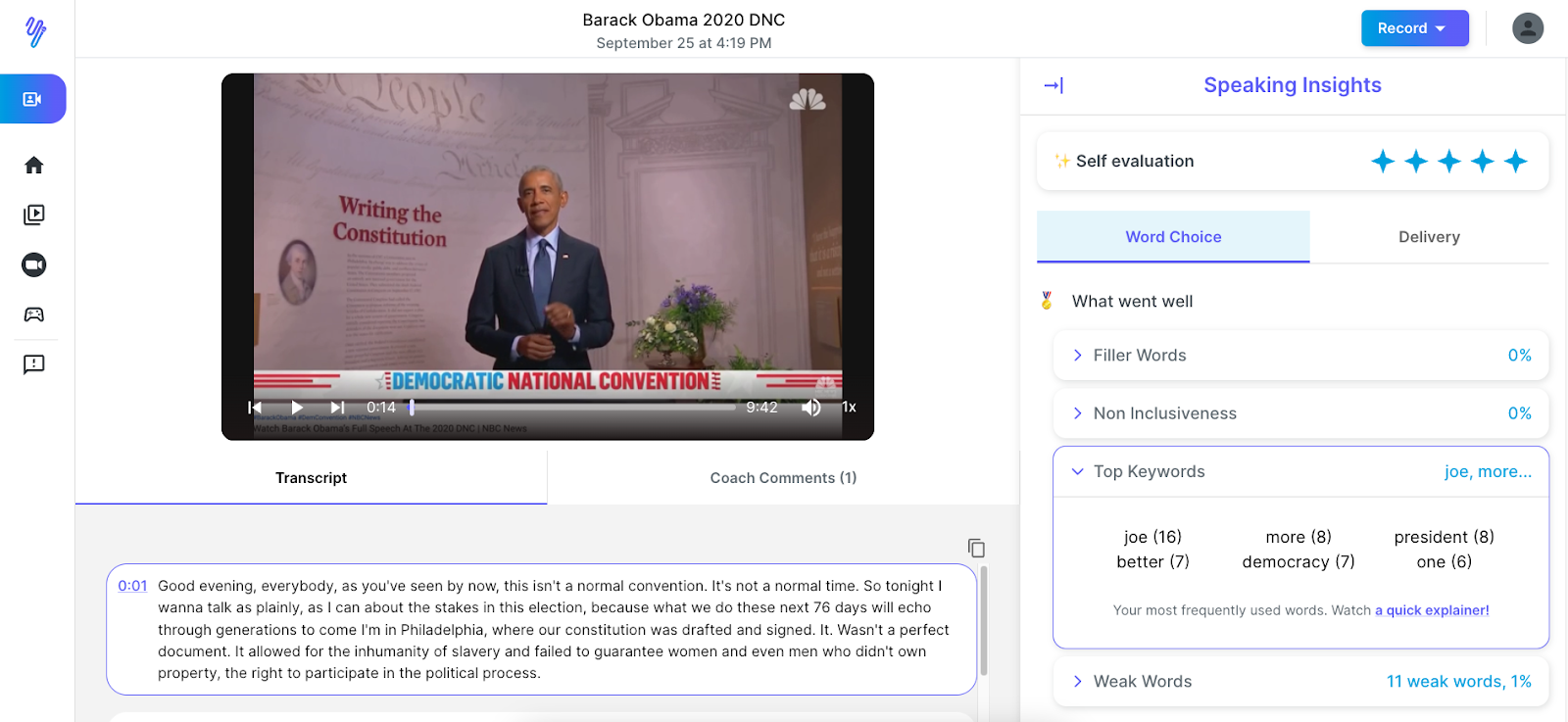
At the 2020 Democratic National Convention, Obama talked about his “friend Joe,” laying out a case for the American people to elect him in November. Whether you agree with Obama or not, you can pick up some of the skills that make him an impactful public speaker.
Continue reading to see how the free Yoodli AI speech coach analyzed Obama’s DNC speech – specifically his visual, verbal, and vocal delivery.
Obama’s DNC speech
The 2020 Democratic National Convention was unlike any other. It was a month late. It was downsized. Most people didn’t even show up … in person. Impacted by the COVID-19 pandemic, the 2020 DNC adjusted accordingly and completed its mission — nominating Joe Biden and Kamala Harris to the Democratic ticket.
Obama delivered his speech virtually, from the Museum of the American Revolution in Philadelphia. Using the U.S. Constitution as both a philosophical and a visual backdrop, he laid out his case for a Biden presidency.
With Obama’s DNC speech, we see an interesting dynamic. Here was a former United States president talking about a former United States vice president and presidential candidate, and he called him “my friend Joe.” Throughout the speech, Obama referred to Biden simply as “Joe,” showing us the close relationship between the two men and portraying the candidate as a regular guy to whom we all can relate.
We’re not going to delve into the political aspects of Obama’s DNC speech, but we are going to take a deep dive into Obama’s visual, verbal, and vocal delivery. Let’s take a look at the real-time analytics from Yoodli AI speech coach for the first 10 minutes of the speech.
Obama’s DNC speech: speaking insights
Yoodli provides insights into two categories here: word choice and delivery. For each, the insights are organized into “what went well” and “what could have gone better.” (Although, for this speech, everything went well for these elements!)
Word choice: filler words
Obama used zero filler words such as um, uh, hm, and you know. The audience didn’t suffer through any wasted or distracting syllables. It’s clear that each word was carefully selected beforehand.
Several factors contribute to this excellent score:
Obama is an experienced and gifted speaker.
He read from a script. He didn’t have to stop and think about what to say next.
He rehearsed.
He took his time.
Word choice: non-inclusiveness
We see another flawless score here. While Obama’s DNC speech certainly included aspects that not everyone agrees with, he didn’t use language that could be taken as discriminatory or profane — words that could unnecessarily alienate someone or make them feel left out just because they’re a particular sex, religion, etc.
You’ll notice that Yoodli uses feedback such as “Nice work!” and “Great job!” when you do well. Whether you’re giving your first speech or you’re as polished as Obama, it boosts your confidence when you receive affirming feedback.
Word choice: top keywords
If you didn’t watch Obama’s DNC speech, you could look at the Top Keywords and see that he talked mostly about “Joe.” Considering the occasion, he was right on theme.
Yoodli’s Top Keywords feature helps you know whether you talked about what you aimed to talk about. It could reveal that you talk about yourself a lot, which you might not realize. You’re not tracking your word count, but Yoodli is, and these insights bring important issues to the surface.
Word choice: weak words
Obama used weak words 11 times, which is only 1% of his speech. That’s excellent! The Yoodli AI speech coach identified five instances of so, three instances of just, two uses of actually, and one seriously.
Weak words are words that, if overused, could indicate a lack of confidence. Generally, they don’t add anything substantive and can detract from the message.
Delivery: eye contact
In the Delivery category, Obama’s DNC speech hit on all cylinders, just as he did in the Word Choice category. The first score is for eye contact. The Yoodli AI speech coach shows that he made eye contact 72% of the time. Obama did well to confidently address his audience.
When you make eye contact with your audience — even when it’s through a camera — they feel more connected to you. You come across as more confident. Connection and confidence contribute significantly to getting your message across effectively.
Delivery: pacing & pauses
Obama’s pace was 129 words per minute — a smidge below average. It’s a relaxed pace that incorporates several deliberate pauses that Obama injected, giving his audience time to digest what he said.
Some might interpret the pacing as lacking a sense of energy and urgency. Obama’s speech wasn’t fiery, but it was earnest.
Obama’s DNC speech: a delivery homerun
It’s been said that the masterful delivery of Obama’s acceptance speech at the 2008 Democratic National Convention helped propel him toward electoral victory. It’s likely that this speech at the 2020 DNC contributed to Biden’s success in November.
Watch more of Obama’s speeches to keep learning from his delivery techniques. To discover how he learned the art of rhetoric, check out this article from writer and journalist Charlotte Higgins. Finally, practice your own public speaking skills at Yoodli for free, using the same AI speech coach that we used to analyze Obama’s DNC speech.
Even the most gifted orators benefit from practicing. Yoodli makes practicing fun and easy. Now’s a great time to start.
Despite a return to post-pandemic habits, remote work, schooling, and virtual meetings are sticking it out for the long run. For some, this is a welcome change, allowing for flexibility to work from home and freedom to wear sweatpants. For others, virtual meetings are a cause for anxiety and undue stress.
If you are one of many who fall in the latter category, you’re in luck – this guide will walk you through the reasons why you may feel anxious about zooming online. You’ll get five actionable tips on how to address these anxieties and a quick introduction to Yoodli, the Zoom-integrated AI speech coach that offers private, judgment-free feedback on your speaking style. (Watch the following 30-second video to learn more.)
Where do your (common) pre-meeting anxieties come from, and how can you address them?
It’s a feeling we’ve all experienced: the uncomfortable rolling in your stomach when you have to click into a virtual meeting. Whether it’s a meeting with a handful of your closest team members or one with hundreds of people, it still feels unnatural to sit there and interact with people through a screen.
The first step to dealing with any self-consciousness you may feel about speaking in virtual meetings is to understand the causes of said self-consciousness. We’ve included a short list of possible reasons and how you can tackle them below:
You’re constantly looking at yourself.
Unlike in real life, on a virtual call, you are always looking at yourself. According to this Insider article, because staring at others can be overwhelming, sometimes keeping your eyes on yourself is the easiest option.
As a result, it’s easy to fall into the trap of overanalyzing yourself: how you look on camera and how actions come off to others in the call. You may start to feel cognitively overwhelmed, making it difficult to concentrate and hindering your performance.
But luckily enough, people often don’t pay as much attention to us as we do. Besides watching the meeting at hand, other meeting participants may be preoccupied with whatever is happening in their immediate environment or (just like you) with how they appear on camera.
Take comfort in knowing that awkward feeling when staring constantly at yourself is perfectly normal.
You don’t know how to avoid awkward small talk.
Part of being a good team member, besides contributing good ideas to discussions, is forming meaningful relationships with your coworkers. Often achieving these connections requires small talk, which makes even the most social of us uncomfortable.
If you’re not sure how to make small talk, start small by asking open-ended questions about whatever you and your conversation partner have in common. Maybe you begin by asking how their most recent project went, taking the conversation to what their favorite break room snack is or what they’re doing for Christmas. The key to mastering small talk is being curious and actively listening so that you can ask thoughtful, well-timed questions.
Hopefully, you’ll stop dreading small talk and genuinely enjoy listening to what otherwise would seem like idle chatter.
You don’t know when to interrupt.
It’s a dilemma to interrupt your coworkers, much less your direct boss or other authority figures. It’s doubly difficult to do so online, where non-verbal communication is limited.
In a bigger conference, make use of the “hand-raise” button or any similar feature to indicate to participants that you wish to speak soon. (In a smaller call, starting with an “actually…” gives the current speaker enough forewarning to wrap up what they are saying and invite you into the conversation.)
Make sure to interject at an appropriate place in the conversation, for example when it’s apparent that the meeting is pivoting to another topic. This way, you don’t cut off the speaker’s train of thought and make it appear as if you’re not listening.
To avoid coming off as confrontational, begin by praising the previous speaker’s contributions. Start with phrases like “Just to build off that idea…” or “Before we move on from ___’s great idea, I wanted to add….”
If you keep these key points in mind, you’ll become a master of interruption – always coming off as insightful and eloquent in your comments. In case you’re worried about cutting in too often, upload your Zoom meetings to Yoodli, which gives you feedback on whether you interrupt too much.
Virtual meetings can be high-stakes.
In this day and age, important meetings involving multiple stakeholders and third parties are held online. How you present yourself to colleagues and superiors can impact how competent you are perceived to be. Being able to speak confidently and play the devil’s advocate well can help you land that promotion, raise, or high-impact project you’ve had your eye on.
These important and therefore high-pressure situations make the most confident of us nervous. If you have the tendency to stumble over your words or fidget during stressful online meetings, don’t worry because you are 100% capable of change.
Read the 5 tips below to learn how you improve your self-presentation in online meetings.
Keep things in perspective.
After learning about the common anxieties people have during online meetings, it’s time to learn how you can better present yourself. Even if you mess up along the way and make a couple of faux pas, just remember people are usually too caught up in how they are perceived to pay attention to what you’re doing.
Even if you mess up – maybe you’ve been caught texting during a boring Zoom session, the ability to play it cool reflects better on you than you think. Everyone (and I mean everyone) has had their fair share of Zoom mishaps and can find humor in the absurdity of it all. Laughing it off can help put things into perspective: everyone makes mistakes so try not to take small things too seriously.
Prepare.
Take steps before your meeting to make the ordeal ten times less stressful.
Sit in front of a window so you can bathe in the glow of natural light! When your face is illuminated, call participants can see your facial expressions clearly. This way, you avoid the misunderstandings that sometimes arise due to the ambiguity of communicating through a computer screen. An additional plus: if your meeting is early in the day, morning light helps you wake up and face the long day ahead.
Adjust the camera angle so it’s at eye level. If your camera is too low, call participants can’t see your eyes, one of your face’s most expressive features. If your camera is too high, all others in the meeting will be able to see of you is your nose!
Read through the meeting agenda to get a good idea of what’s going to be discussed. You’ll be able to engage more closely with the meeting’s contents and make high-impact recommendations, impressing your audience.
Think about your body language.
The hardest thing to do in online meetings is to communicate non-verbally. The camera usually shows just your face and shoulders, impeding the work your hands and posture do in demonstrating how you feel (for example, whether you want to come off as more assertive or cooperative).
That’s why it’s important you do well with what you can. Sit straight to communicate confidence and alertness. Look at the camera (and not at other meeting participants) as much as possible to simulate the eye contact you’d make in real life. Gesticulate with your hands to engage your audience and better make your point.
Most importantly, don’t forget to smile 🙂. Not only will it put your viewers in a better mood; it’ll energize you as well.
Pay attention to how you’re speaking.
To complement strong body language, speak clearly and loudly. This is especially important in an online setting: connection issues can make your video lag, disengaging listeners if they don’t have compelling audio to listen to.
If you’re not sure which part of your verbal communication you want to work on, enlist the help of Yoodli. You can connect your resident AI speech coach to your Google Calendar; Yoodli automatically joins Zoom calls it’s been given permission to and records the meeting. Afterward, Yoodli sends you a personalized report with feedback on your word choice (whether you’re using filler words, non-inclusive language, etc.) and your delivery (whether you’re speaking too fast, talking too much, and more).
Make a conscious effort to improve — be kind to yourself!
After using Yoodli for multiple Zoom meetings (or recordings that you’ve uploaded individually), you’ll start seeing a pattern of your strengths and weaknesses. Make a mental checklist of what you need to work on and prioritize accordingly. Work on one weakness at a time, giving yourself grace throughout the whole process.
For example, if you notice you’re not speaking up enough, set a goal to offer one to two meaningful contributions per meeting. This can take the form of an aptly-timed question or an insightful comment.
No matter what goal you choose and which method you employ, celebrate your victories, and don’t get too bogged down by failures. If you do your best to improve, change is inevitable!
Most people view public speaking as a daunting task. It doesn’t have to be, though. If you take the time to prepare properly, your speech can be fun, casual, and engaging. Here’s a simple, step-by-step framework to help you get started.
Step 1: Identify your message.
What is the one core message of your speech? What is the main point that you want to get across to your audience. Once you have identified your message, you can start to develop the content of your speech around it.
Try describing your message in 100 characters or less. This exercise will force you to get to the root of what you want to say, and will help you stay focused as you develop the rest of your speech. Treat this message as your anchor. Every story and example should ideally tie back to this core message.
Step 2: Know your audience.
Who are you speaking to? What is their age, gender, education level, interests, etc? Why should they care? It is important to tailor your message to your audience so that they can relate to it and understand it. Consider their needs, wants, and level of knowledge on the topic.
A speech is only successful if it achieves its purpose. In order to do this, the speech needs to be carefully crafted to appeal to the audience and move them to take action. The first step is to identify the goal of the speech. What is the takeaway that you want this specific audience to leave with? Once this has been determined, you can begin to tailor the speech to achieve that goal. Only by understanding the audience can you hope to move them to take action. If done correctly, a speech can be an incredibly powerful tool for change.
Step 3: Outline your speech.
After you have determined your message and who your audience is, you can start to outline your speech. Begin by brainstorming the main points and sub-points that you want to make. This will help you stay on track while delivering your speech.
Any good speech should have a hook to grab the audience’s attention. The hook can be anything from a joke to an interesting fact related to the topic of your speech.
Once you have the audience’s attention, it’s important to keep them engaged by delivering a clear and well-organized body. The body of your speech should be structured like any other piece of writing, with an introduction, several main points, and a conclusion.
Finally, you’ll want to close your speech with a bang. This is your chance to leave the audience with a memorable thought or call to action. By following these simple tips, you can make sure that your next speech is one that people will remember.
A well structured speech is a lot more easier to remember. Spending a little extra time organizing your speech will save you time in the delivery down the road.
Step 4: Rehearse your presentation.
Public speaking is not natural. Like any skill, it needs to be practiced.
It’s always a good idea to rehearse your speech before giving it. This will help you to iron out any wrinkles and make sure that you deliver your message effectively. Practice in front of a mirror, or record yourself on a platform like Yoodli so that you can see how you come across to an audience. Pay attention to your body language and use gestures at the right moments. Make eye contact with your audience and speak in a clear, engaging voice. By taking the time to rehearse, you’ll be able to give a speech that is polished and professional. Time yourself. Know how long your speech should be and stay within that limit. This will ensure that you do not go over or under the allotted time for your speech.
The opening 30 seconds and the closing 30 seconds are the most important sections. The audience will remember these the most and you want to make sure it is delivered well. Most novice speakers restart the routine when they make a mistake. This is a mistake because they are shaky towards the end of their speech. Break up your outline into its individual components and practice them out of order to get comfortable with all sections of the speech.
Step 5: Ask for feedback.
When it comes to giving speeches, there is always room for improvement. One way to get better is to ask for feedback from your audience. This can easily be done on a free tool like Yoodli. Simply record your speech and share it with a peer or mentor. They can easily give you timestamped feedback directly on the platform.
Constructive feedback will help you to see what areas you need to work on, and what parts of your speech are effective. It can be difficult to hear criticism, but remember that this feedback is meant to help you improve. If you are open to hearing what others have to say, you will be able to take your speeches to the next level.
Wrapping Up
By following this simple framework, you can make sure that your next speech is one that people will remember. A well-structured speech is easier to deliver and more likely to engage the audience. Practice makes perfect, so don’t be afraid to rehearse your speech before giving it. And finally, seek out feedback from others so that you can continue to improve your skills. With a little effort, you can make sure that your next speech is a success.
It’s estimated that public speaking is the number one fear in America. And it’s not hard to see why. Public speaking can be a daunting task for even the most experienced speakers. For many people, the fear of public speaking is so great that it keeps them from pursuing opportunities that would benefit them professionally and personally. But, with a little bit of preparation and practice, you can overcome your fear of public speaking and become a confident and successful speaker.
Tip #1: Understand why you’re afraid.
Many people are afraid of public speaking. If you’re one of them, it’s important to understand why you’re afraid. Only then can you start to overcome your fear. For some people, the fear of public speaking is a result of a previous bad experience. Maybe they were laughed at or ridiculed by their audience. Or maybe they simply froze up and couldn’t remember what they were going to say.
Whatever the case may be, that bad experience has left them feeling scared and anxious about speaking in front of others. For others, the fear of public speaking may be more generalized anxiety. They may be worried about being judged or making a fool of themselves. They might even be afraid of success. Whatever the reason, it’s important to understand your fear so that you can start to work on overcoming it.
Tip #2: Break it down into manageable pieces.
Many people are afraid of public speaking, and with good reason. It can be daunting to stand in front of a group of people and give a speech, especially if you’re not used to it. However, there are ways to break down your fear and make it more manageable. First, start by thinking about what it is that you’re afraid of. Are you worried about forgetting your lines, or about being laughed at? Once you know what your specific fears are, you can start to address them.
For example, if you’re worried about forgetting your lines, try memorizing them or writing them down before the event. If you’re worried about being laughed at, remind yourself that not everyone will find your speech hilarious and that it’s okay to be serious. Breaking down your fear into manageable pieces will make it easier to deal with and will help you feel more confident when it comes time to speak.
Tip #3: Confront your fear head-on.
Standing up in front of a group of people and delivering a speech can be a daunting prospect. But while it may seem easier to avoid the situation altogether, this isn’t necessarily the best course of action. Confronting your fear head-on is often the quickest and most effective way to overcome it. By facing your fears, you’ll gain a greater understanding of what they are and how to deal with them. In addition, you’ll also build confidence and self-esteem.
This doesn’t mean you need to jump on a large stage. Start small. Try practicing in front of a small group of people (maybe trusted friends or family) to get started. Ask for constructive feedback and build momentum and confidence.
Tip #4: Practice, practice, practice.
When it comes to public speaking, the old adage of practice makes perfect definitely holds true. The more you get up in front of an audience, the more comfortable you will become with speaking. And as you become more comfortable, your confidence will grow. This in turn will help you to better engage with your audience and deliver a more effective speech. So if you’re looking to improve your public speaking skills, the best thing to do is just get out there and start practicing.
You can also try practicing with a friend or virtually. Record yourself so that you can watch a replay and identify areas to improve. Yoodli is free resource to help you practice your speech and get useful feedback to improve in a safe environment
Tip #5: Visualize success.
One of the best ways to achieve success is to visualization. See yourself succeeding in your mind and it will help to affirmation your goals. Keep a positive mindset and think about all of the reasons why you will be successful. When you see yourself reaching your goals, it will help to motivate you to take the necessary steps to achieve them. make sure to be as specific as possible when visualizing your success and include as many details as you can. The more realistic your visualization, the more likely you are to achieve your goals. So go ahead and visualize your success today! You might be surprised at how quickly you achieve it.
Tip #6: Consult a professional.
We all need a little help from time to time. Whether we’re struggling with our careers, our relationships, or our mental health, it’s important to seek out professional help if we need it. There’s no shame in admitting that you need some guidance, and there are plenty of resources available to get the support you need. If you’re feeling stuck in your career, toastmasters can help you develop your public speaking and leadership skills. If you’re having trouble in your relationship, a coach can help you communication effectively and work through your issues. And if you’re dealing with mental health issues, there are counselors and therapists who can help you manage your symptoms and live a happy, healthy life. Don’t be afraid to reach out for help when you need it — it could be the best decision you ever make!
Wrapping Up
Public speaking can be a daunting prospect, but it’s important to remember that everyone has fears and that there are ways to overcome them. By breaking down your fear into manageable pieces, confronting your fear head-on, practicing as much as possible, and seeking professional help if needed, you’ll be on your way to becoming a confident public speaker.
Each of us at Yoodli has experienced our own challenges with public speaking — overcoming a lisp, freezing during a job interview, feeling anxious about speaking up as the only woman in a meeting.
Turns out, we are not alone. Studies show that fear of public speaking affects up to a third of the population. Most people rank it higher than the fear of death!
We started Yoodli to help people improve their public speaking skills without the pressure of an audience. And, it’s been a busy past few months for us! We raised over $1 million in a pre-seed round from the Allen Institute for AI and Madrona Venture Group to super-charge our development. We’re currently headquartered at the AI2 Incubator, surrounded by some of the leading minds in artificial intelligence. We also opened our product waitlist at yoodli.ai and have been encouraged by the overwhelming response from thousands of people. A big thank you to all of our beta testers and advisors for the ongoing feedback.
Public speaking training should be fun, uplifting, and collaborative. Yoodli’s technology uses AI to help you improve your verbal and non-verbal communication skills and track progress over time. You can share your speeches with colleagues for feedback, view your real-time transcript and analytics, and challenge friends to play speaking games!
We’ve been partnering with hundreds of speech coaches, interview coaches, and public speaking experts from across the world to build a platform that they wish they had when they started out. If you are a speaking professional interested in collaborating, reach out at info@yoodli.ai.
Whether you’re rehearsing for an upcoming Zoom presentation, defending your PhD thesis, or preparing for a job interview, Yoodli is here to help you prepare for moments that matter most. Try out the product here (it’s free!), and be sure to tell a friend!